Destination eSIMs
Best eSIM for Bali Travel: Data, Setup, and IMEI Checks Before You Land
Find the best esim for bali travel by matching data size, phone compatibility, hotspot needs, airport setup, and official IMEI guidance.
The best esim for bali travel is not always the cheapest plan on the first comparison page. Bali travelers need reliable arrival data, enough GB for maps and rideshare, clear hotspot rules, and a setup process that works before airport Wi-Fi gets crowded.
For most visitors, the best esim for bali travel is the plan that matches your phone, trip length, and data habits. A light traveler checking maps and messages needs a different plan than a remote worker uploading video from Canggu or Ubud.
This guide keeps the decision practical: compatibility first, data needs second, arrival setup third, and official phone-rule checks when your situation is unusual or long-stay.
| What you see | Likely cause | First move |
|---|---|---|
| The phone shows no signal after landing | The eSIM line is installed but roaming/data is off | Check line settings before leaving the airport |
| The plan runs out quickly | Video calls, uploads, or hotspot used more data than expected | Buy more GB or a longer validity window |
| Hotspot does not work | Some travel plans limit tethering | Check provider hotspot policy before purchase |
| The phone asks for setup while offline | QR code or app access was not saved | Install before departure and keep backup instructions |
Confirm your phone can use a travel eSIM
Before comparing providers, confirm that your phone supports eSIM and is unlocked. If a carrier lock blocks another data line, the best esim for bali travel will not help. iPhone users can review the official Apple guidance and install the line before leaving home.
For iPhone-specific steps, use our eSIM for iPhone travel setup guide. Android users should check the device eSIM menu, carrier lock status, and provider instructions before buying.
Also save the QR code, activation code, and provider support page offline. If the app needs a login code sent by SMS, make sure your primary number can still receive messages while traveling.
Match data size to how you travel in Bali
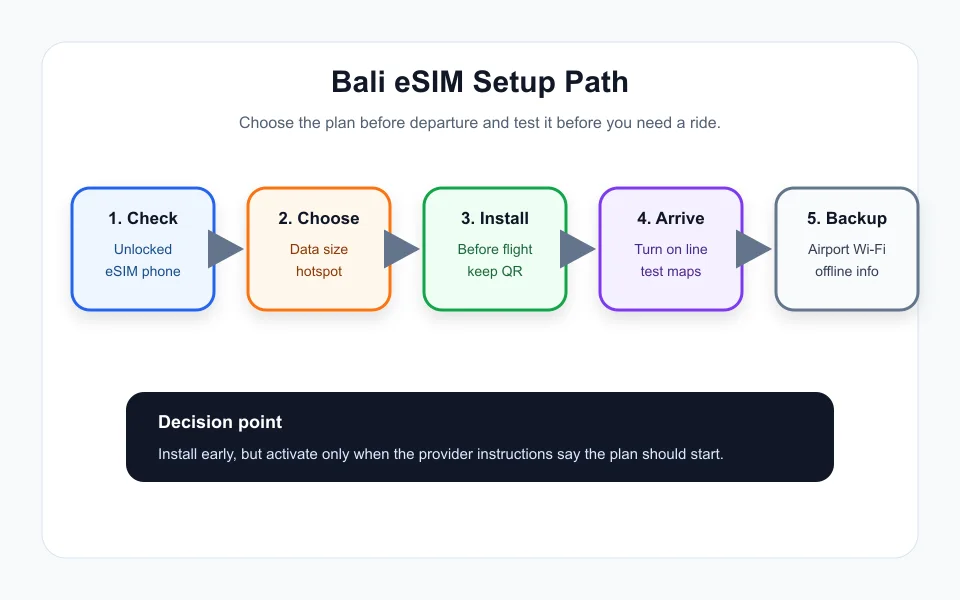
A short holiday with hotel Wi-Fi may only need a small plan for maps, messaging, ride apps, restaurant searches, and emergency calls. A creator, digital nomad, or family hotspot user should buy more data than the minimum.
The best esim for bali travel should cover the first few days without forcing you to hunt for Wi-Fi. Video uploads, cloud photo sync, live streaming, and hotspot use can burn through a small package fast.
If you are deciding between a travel eSIM and your home carrier, compare the math in eSIM vs roaming cost. Roaming day passes can look easy but become expensive on longer trips.
Check hotspot and app restrictions before buying
Some plans advertise generous data but limit hotspot, speed, or top-ups. If you need to tether a laptop, share data with a partner, or join video calls, read the provider details before checkout.
The best esim for bali travel for a solo tourist may be different from the best plan for a remote worker. A cheap plan can be fine for Google Maps and WhatsApp, while a work trip may need stronger support and simple top-ups.
Provider comparisons such as Airalo vs Nomad vs Saily can help, but always check the current Bali or Indonesia plan page before paying.
Understand arrival setup and IMEI questions
Many visitors simply install a travel eSIM, land, enable the line, turn on data roaming for that line, and test maps. Still, Indonesia has phone registration rules that can matter for imported phones, longer stays, local SIM use, or unusual device situations.
Because rules and processes can change, use the official Indonesian Customs IMEI portal when you need a definitive answer. Do not rely on a random forum thread for phone registration decisions.
If you are worried about connection without Wi-Fi, read does eSIM work without Wi-Fi. The short version is that installation and activation rules vary, so prepare before you are offline.
Keep a backup plan for airport and island travel
Bali arrival can be busy. Keep offline maps, hotel address, first ride instructions, and provider support details available without mobile data. If activation takes a few minutes, you can still move through the airport calmly.
The best esim for bali travel should make the first day easier, not create another chore. Test the line before leaving the airport area, then check coverage again when you move between beach areas, Ubud, and smaller roads.
If your trip includes another country, compare nearby guides such as best eSIM for Thailand travel. A regional Asia plan can be convenient, but sometimes destination-specific plans have better value.
Quick Checklist
- Confirm the phone is unlocked and eSIM-compatible.
- Use the best esim for bali travel only after checking hotspot rules.
- Choose enough data for maps, rideshare, messaging, and uploads.
- Install or save setup instructions before departure.
- Turn on the eSIM line and data roaming for that line after arrival.
- Keep offline maps and hotel details as backup.
- Check official IMEI guidance if your phone situation or stay length makes it relevant.
Bottom Line
The best esim for bali travel is the plan that fits your phone, data use, hotspot needs, and arrival routine. Buy before the trip, keep setup details offline, and verify official IMEI guidance when your device situation is not straightforward.
Frequently Asked Questions
What is the best esim for bali travel?
The best option depends on trip length, phone compatibility, data size, hotspot needs, support, and whether you need a single-country or regional Asia plan.
Should I install my Bali eSIM before flying?
Usually yes, if the provider allows pre-installation. Follow the provider instructions because some plans start when installed and others start when connected.
How much data do I need for Bali?
Light travelers may only need a small plan, while hotspot users, remote workers, and video uploaders should buy a larger data package.
Can I use hotspot with a Bali travel eSIM?
Some eSIM plans allow hotspot and some restrict it, so check the provider details before buying if tethering matters.
Do tourists need to register IMEI in Indonesia?
Rules can depend on the device and situation, so check the official Indonesian Customs IMEI portal for current guidance before relying on a local or imported-phone setup.
Official sources: Apple Support: Use eSIM while traveling internationally · Indonesian Customs IMEI registration portal. Check current program pages before applying.